
Blog
CISS Maintenance: How to Care for and Use Your System

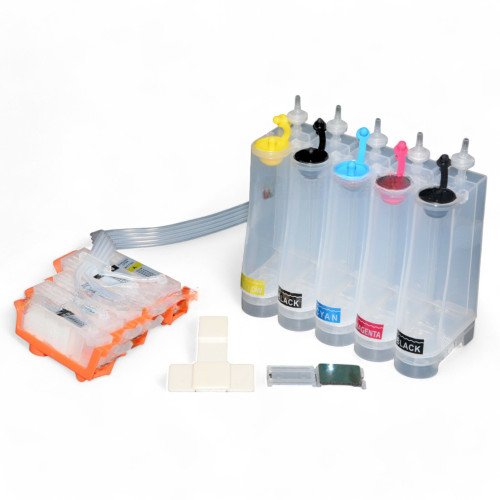
A continuous ink supply system (CISS) can significantly reduce printing costs and minimise interruptions for cartridge changes. To work reliably for years, the system needs proper care. Regular maintenance helps prevent printhead clogs, air in the ink lines, and other problems.
Inspect the System Regularly
Periodically check all parts of the CISS, including the ink reservoirs, tubing, connections, and cartridge assembly. Pay particular attention to the tubing connections and look for leaks, kinks, or damage.
Keep an eye on the ink levels in the reservoirs. Refill them before they run empty, as this can allow air into the system and disrupt ink flow.

How to Care for the Ink Tubes and Keep Air Out
The CISS tubing should move freely as the printhead travels. Make sure it stays clear of moving printer parts and does not kink. Gently wipe dust and dirt from the outside of the tubes with a soft, lint-free cloth. Avoid harsh solvents and excessive pressure on the tubing.
Air bubbles in the ink lines can cause missing colours, streaks, and uneven printing. To reduce the risk of air entering the system, refill the reservoirs on time, check that the connections are airtight, and move the system only when necessary.
If air has already entered the ink lines, follow the CISS manufacturer’s instructions or contact a technician. Avoid dismantling the system yourself or running repeated printhead cleaning cycles.
How to Store Ink Properly
Ink quality directly affects print consistency and the condition of the printhead. Use ink that is compatible with your specific printer model and printing technology.
Store ink in its original, tightly sealed packaging in a dry place away from direct sunlight and sudden temperature changes. Avoid using expired ink or ink from unknown sources. Only mix different ink formulations if their compatibility has been confirmed.

How to Keep Your Printer in Good Working Order
Even with a CISS, a printer needs regular use. If it sits idle for long periods, ink can dry in the printhead nozzles. If you print infrequently, run a test print from time to time to check that all colours are printing correctly.
Run automatic cleaning cycles only when needed. They consume ink and put extra strain on the waste ink system. If print quality drops, start by checking the ink levels and tubing, then run a nozzle check.
How long a CISS lasts depends on component quality, ink compatibility, and regular maintenance. Checking the reservoirs, caring for the tubing, monitoring ink flow, and following the manufacturer’s recommendations can help keep your printer running reliably and avoid unnecessary repair costs. For a quality continuous ink supply system designed to provide years of reliable service, visit PRINTOUT24.

Azim Premji and Anna Wintour: Why They Make Headlines

Denzel Washington and Aretha Franklin: The Untold Story

Microgrid Controller for Grid-to-Island Transitions

Clint Eastwood Net Worth and Family Life: What You Didn’t Know

Best X Video Downloader Without Watermark — How to Get Clean HD Files

Inside Richard Hammond’s Life: How He Built His Net Worth
-
 Celebrity1 year ago
Clint Eastwood Net Worth and Family Life: What You Didn’t Know
-
 Technology7 months ago
Best X Video Downloader Without Watermark — How to Get Clean HD Files
-
 Celebrity1 year ago
Inside Richard Hammond’s Life: How He Built His Net Worth
-

 Celebrity2 years ago
Guy Willison Net Worth: The Story Behind the Motorcycle Legend